The buttons on the side
Two or three small buttons do almost everything on a phone: power, volume up, and volume down. One rule covers them all — tap for now, hold for more. But what "hold" does depends on your phone — find yours below.
A quick press of the power button turns the screen off or on. The phone keeps working underneath — calls still come in, alarms still ring. Think of it as closing your eyes, not going to sleep.
Holding the Side button (right edge) calls up Siri, the voice helper. To turn the phone fully off or restart it, hold the Side button together with either volume button (left edge), then slide the on-screen switch to power off.
Holding the power button (right edge) opens a menu with Power off and Restart. This is how you turn the phone fully off, or restart it when something acts up. On newer Samsung phones, if holding the power button wakes the voice assistant instead, hold power + volume down together for the same menu.
These change whatever sound is playing right now — music, a video, a call. On the lock screen, with nothing playing, they change the ringer instead — the ringer is the sound your phone makes when someone calls.

Photo: Kyu3, Wikimedia Commons, CC BY-SA 4.0

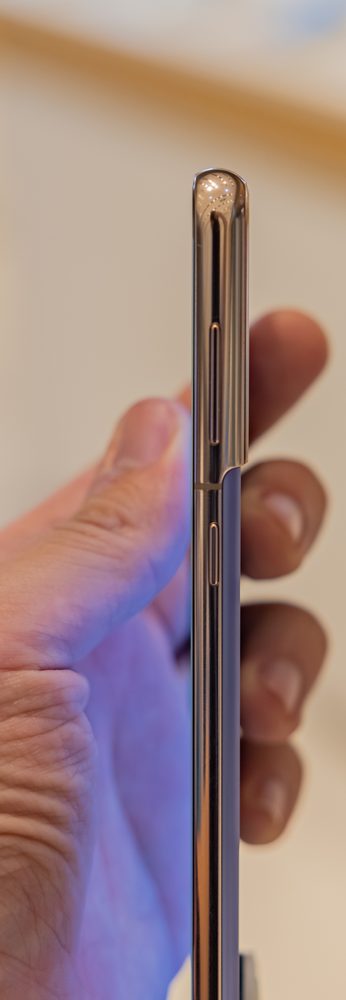
Photo: Dinkun Chen, Wikimedia Commons, CC BY-SA 4.0

Where are they?
- iPhone: the Side (power) button is on the right edge; the two volume buttons are on the left edge.
- Android (Samsung, Pixel, Motorola): the power button and the volume buttons are all on the right edge, usually with volume above or below power. The exact order varies a little by brand — that is normal.
Straight 2 Work Tech, LLC — patient, plain-words tech help.
(813) 770-6082