Notifications & quiet time
Notifications are the little pop-ups and sounds apps use to get your attention. Some are useful (a text from family). Most are noise (a game begging you to come back). You are in charge — here is how to turn down the noise and enjoy real quiet when you want it.
Quiet one noisy app
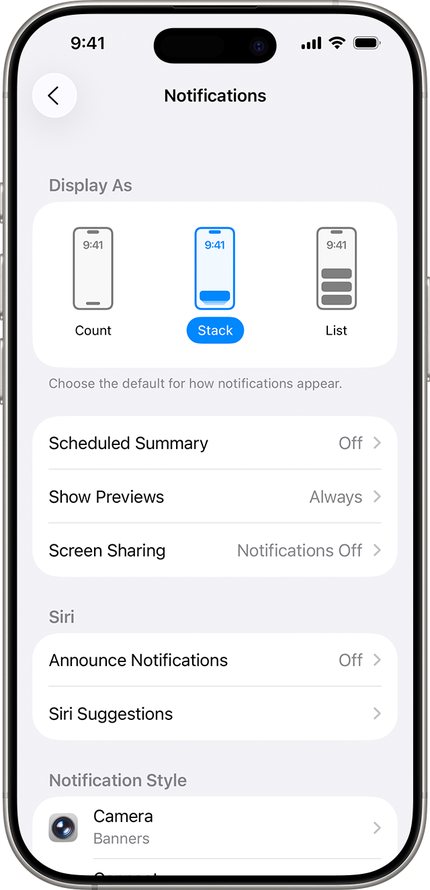
- iPhone: open Settings, tap Notifications, pick the app, and switch off Allow Notifications. Samsung: open Settings, tap Notifications, tap App notifications, and switch the noisy app off. Google Pixel: open Settings, tap Notifications, tap App notifications, pick the app, and switch it off there — other Android phones keep the same setting under Apps.
- The app still works fine — it just stops interrupting you.
Do Not Disturb for sleep and rest
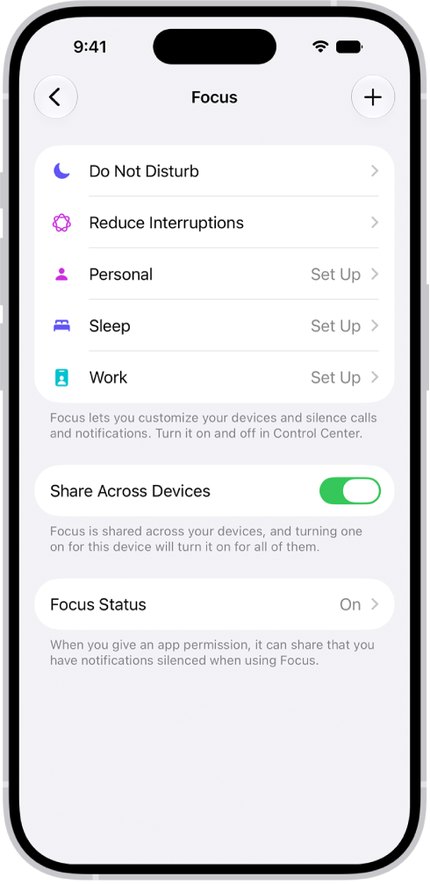
- iPhone: open Settings, tap Focus, tap Do Not Disturb, and set a schedule (for example 10 PM to 7 AM). Samsung: open Settings, tap Modes and Routines (or Do not disturb), and set your quiet hours. Google Pixel: open Settings, tap Sound & vibration, tap Do Not Disturb, and set your schedule under Schedules.
- Calls from your favorites still come through in an emergency — add family to your Favorites or starred contacts so they can always reach you. On a Pixel, the people allowed through are chosen in the same Do Not Disturb screen, under People.
Tip: start with one noisy app — the game or store that pings you most. Quieting just that one usually makes the phone feel calmer right away.
Straight 2 Work Tech, LLC — patient, plain-words tech help.
(813) 770-6082