The best TVs for your money.

Every pick is judged on four things: how smoothly it works, how easy it is to use, how good the picture looks, and how clear the sound is. Then we compare what you get for the price.

Models and prices were checked on September 25, 2026. Prices change often. Use the buttons under each TV to check today’s price.
Spend less

Best for budget

These picks give you the best balance of smooth performance, simple use, picture, and sound at a lower price. More money does not always mean easier menus.

Around $500

Lowest price
Around $250 • 50 inches

Roku Select Series 4K QLED (2026)

Ranked the best low-price choice because it is the easiest TV here to live with. It keeps the remote and home screen simple while still giving you a bright 4K picture and clear voices.

PerformanceGood. Apps open quickly enough for everyday streaming. Motion is fine for regular shows, but not as smooth as the faster TVs below.
Easy to useBest here. Roku has the simplest home screen and the least confusing remote in this guide.
PictureGood for the price. QLED color looks bright and lively. Dark scenes have less depth than Mini-LED or OLED.
SoundGood for voices. Speech is clear and volume is strong enough for a smaller room. Add a soundbar only if you want fuller bass.

Exact model: 50R5D5
Best near $500
Around $500–$600 • 55 inches

TCL QM6K Mini-LED (2025)

Ranked the best all-around TV near $500 because it improves all four areas without a premium price. It is quicker, brighter, smoother, and fuller-sounding than a basic budget TV.

PerformanceVery good. Google TV responds well, and the 144Hz screen keeps sports and fast movement smooth.
Easy to useGood. Setup is straightforward and the voice remote helps. Google TV shows more choices on screen than Roku, so it can feel busier.
PictureExcellent for the price. Mini-LED gives you strong brightness, deeper dark scenes, and fuller color. Dolby Vision helps supported movies look natural.
SoundVery good for the price. Its Onkyo 2.1 speaker system includes a small built-in subwoofer, so voices and bass sound fuller than on most budget TVs.

Exact model: 55QM6K

Around $1,500

Best premium value
Around $1,400 • 65 inches

Samsung S90F QD-OLED (2025)

Ranked the best premium value because it delivers one of the strongest pictures in the guide for well under $2,000. Consumer Reports gave this 65-inch model its top 2026 TV score.

PerformanceExcellent. Menus and streaming respond quickly. The 144Hz support keeps sports, games, and fast action very smooth.
Easy to useVery good. Samsung’s Tizen home screen is clear and can be personalized, though it has more choices than Roku.
PictureExcellent. QD-OLED gives you truly black dark scenes and especially vivid color. It uses HDR10+ instead of Dolby Vision.
SoundVery good. Voice enhancement helps dialogue stay clear, and sound follows action on screen. A soundbar still adds deeper bass.

Exact model: QN65S90FAFXZA • Rating source

Spend for a visible reason

Worth paying more for

These step-up picks rank higher for picture, motion, or built-in sound. Each one earns its price with a difference you can notice every day.

Around $1,500

Best from every seat
Around $1,300–$1,500 • 65 inches

LG C5 OLED evo (2025)

Ranked the best all-around choice for a family room because its picture stays rich and clear from almost every seat. A 2026 review also rated it the best all-around TV for most people.

PerformanceExcellent. webOS responds quickly, and the 120Hz screen keeps sports and fast movement smooth.
Easy to useGood. Apps are easy to reach after setup. The pointer-style remote and busy menus can take a little time to learn.
PictureExcellent. OLED gives you deep blacks, natural color, and a clear view from side seats. Dolby Vision is included.
SoundGood. Voices are clear for everyday viewing, but a soundbar gives movies and music more weight.

Exact model: OLED65C5PUA • Review source

Best for a sunny room
Around $1,500 • 65 inches

TCL QM8L Mini-LED (2026)

Ranked the best bright-room TV because it stays clear when sunlight and reflections wash out many other screens. It also has the strongest built-in sound in this guide.

PerformanceExcellent. Google TV handles streaming smoothly, and the high-refresh screen keeps sports and games fluid.
Easy to useGood. The voice remote helps you search without typing. Google TV puts many suggestions on screen, so it is not as simple as Roku.
PictureExcellent in daylight. Very high brightness, strong glare control, and rich Mini-LED color make it the clear sunny-room winner.
SoundBest here. The built-in Bang & Olufsen audio is fuller and more powerful than typical thin-TV speakers.

Exact model: 65QM8L

$2,000–$3,000

Brighter premium OLED
Around $2,200–$2,300 • 65 inches

LG G5 OLED evo (2025)

Ranked the best 65-inch picture because it combines true OLED blacks with much more brightness than a typical OLED. It costs more, but the improvement is easy to see in both movies and daytime viewing.

PerformanceExcellent. Menus respond quickly, and the 165Hz support gives sports and fast action exceptionally smooth motion.
Easy to useGood. webOS puts the main apps together, but the pointer remote and extra options take more learning than Roku.
PictureBest 65-inch picture. You get deep blacks, a bright image, rich color, and Dolby Vision. A five-year panel warranty adds reassurance.
SoundVery good. Dolby Atmos adds space and voices stay clear. For sound that matches this premium picture, plan on a soundbar.

Exact model: OLED65G5WUA

Best big-screen step-up
Around $2,600–$2,700 • 77 inches

LG C6H OLED evo (2026)

Ranked the best big-screen step-up because its 77-inch OLED picture feels truly theater-like without giving up speed or side-seat picture quality. The extra money buys a difference you can see immediately.

PerformanceExcellent. LG’s newer processor finds shows quickly, and the high-refresh screen keeps motion crisp and smooth.
Easy to useGood. webOS offers plenty of apps and voice search. It is flexible, but its many choices can feel busy at first.
PictureExcellent and huge. The bright OLED screen gives you deep blacks, rich color, Dolby Vision, and a clear picture from side seats.
SoundVery good. Dolby Atmos gives the built-in sound more space. A soundbar is still worthwhile for a 77-inch home-theater setup.

Exact model: OLED77C6HUP

Know the brands

The six brands behind most TVs

These six brands sell the most televisions in America. Here is a plain-English look at each one: how easy the menus are, how the picture looks, and who actually makes the screen. Brand guide updated September 25, 2026.

Who actually makes your TV's screen?

Here is something the TV business does not advertise: only a few companies make the screens. Most brands buy them, then add their own picture processing, menus, remote, and design. That is where the brands really differ.

LG Display

Makes almost all the OLED screens in the world. It sells them to LG, Sony, Vizio, and Panasonic.

Samsung Display

Makes QD-OLED screens, a premium type with very rich color. Used by Samsung and Sony.

TCL's screen company (CSOT)

One of the world's largest LCD screen makers. It supplies TCL, and it sells screens to Samsung and others.

BOE and AUO

Make LCD screens for many brands, including Hisense and Vizio.

The six brands, compared

Biggest seller
Budget to premium • Every screen size

Samsung

The most popular TV brand in America. You will find a Samsung at almost every price, and the menus are quick.

Smart hubFast. Samsung's own Tizen system. The home screen is tidy and quick. It shows more choices than Roku, so it can feel busier.
PictureExcellent. The top screens have deep blacks and very rich color. The bright screens stay clear in sunny rooms. Note: Samsung does not support Dolby Vision, a movie format most other brands include.
Screen makerSamsung no longer makes standard LCD screens. Its premium QD-OLED screens come from a sister company, Samsung Display. Its other screens are bought from TCL's screen company and other makers.
StrengthsA model at every price. Fast menus. Very bright options for sunny rooms. Long software support.
Watch-outsNo Dolby Vision. The home screen shows ads and suggestions. More on-screen choices than the simplest brands.
OLED leader
Mid-range to premium • Every screen size

LG

The leader in OLED TVs, the type with the deepest, truest blacks. A strong pick when movies matter to you.

Smart hubSmooth. LG's own webOS system. It runs smoothly and you can rearrange it. The pointer-style remote takes a little practice.
PictureExcellent. Dark scenes look truly black, and the picture stays clear from side seats. Includes Dolby Vision.
Screen makerA sister company, LG Display, makes almost all the OLED screens in the world, including the ones inside Sony, Vizio, and Panasonic TVs. LG's other screens are bought from outside makers.
StrengthsSuperb OLED picture. Clear from every seat. Dolby Vision included.
Watch-outsPremium prices. Not the brightest choice for very sunny rooms. The remote takes some learning.
Most natural picture
Mid-range to premium • Fewer sizes

Sony

The choice for the most natural, movie-like picture. Sony costs more, and its picture processing is widely praised.

Smart hubMost apps. Google TV, with the largest app selection and good voice search. It shows many suggestions, so it feels busier than Roku.
PictureExcellent. Colors look natural, and regular shows and sports look their best thanks to Sony's processing. Includes Dolby Vision.
Screen makerSony does not make its own screens. It buys premium QD-OLED screens from Samsung Display and standard OLED screens from LG Display.
StrengthsMost natural picture. Makes older shows look good. Strong built-in sound on premium models.
Watch-outsHighest prices. Fewer models and sizes to choose from.
Best value
Budget to mid-range • Up to very large sizes

TCL

The value leader. TCL gives you a big, bright screen for less money than the big Korean brands.

Smart hubYour choice. Most TCL TVs use Google TV, with a large app library and voice remote. Some use Roku, which has the simplest menus. Check which one your model uses.
PictureVery good for the price. The Mini-LED screens are bright and colorful, a strong choice for sunny rooms.
Screen makerTCL makes its own screens through its screen company, CSOT, one of the largest screen makers in the world. It bought Samsung's and LG's old screen factories, and it sells screens to Samsung.
StrengthsBig screens for less money. Bright picture. Controls its own screen supply.
Watch-outsQuality varies between budget and premium lines. Google TV menus are busier than Roku.
Bright for less
Budget to mid-range • Up to very large sizes

Hisense

Another strong value brand, known for very bright screens at fair prices.

Smart hubVaries by model. Hisense uses different systems by model: Google TV, Roku, Fire TV, or its own VIDAA. Google TV has the most apps. VIDAA is simpler with fewer apps.
PictureVery good for the price. The Mini-LED screens, called ULED, are bright and punchy, good for daytime viewing. Includes Dolby Vision.
Screen makerHisense buys its screens from outside makers. It does not make its own screens.
StrengthsVery bright screens for the money. Fair prices. A choice of smart systems.
Watch-outsThe smart system changes by model, which can be confusing. Picture processing is a step behind Sony and LG.
Lowest prices
Budget • Now owned by Walmart

Vizio

The budget pick. Vizio TVs cost less than most, and the company is now owned by Walmart.

Smart hubMost ads. Vizio's own SmartCast. It includes free channels and can show video from your phone, but it has the most ads of any brand here and fewer apps.
PictureGood for the price. Fine color and brightness for everyday watching, though not as refined as the premium brands.
Screen makerVizio buys all of its screens from outside makers. It does not make its own screens.
StrengthsLowest prices. Fine for a bedroom or second TV. Free channels built in.
Watch-outsMost on-screen ads. Fewer apps. Newer models ask you to sign in with a Walmart account.

Does paying more make a TV last longer?

Not necessarily. A higher price usually buys a better picture, more brightness, or a larger screen. It does not promise more years of life.

All of these are fast enough for normal streaming.A premium model may feel smoother, but picture quality is the bigger difference.
Smart-TV apps change over time.No brand can promise that every app will stay fast forever. Buy the picture and size you will enjoy now.

What size should you get?

Think about how far your favorite seat is from the screen. These ranges are a comfortable starting point for most rooms.

50–55″

About 6 to 8 feet away

A comfortable fit for a bedroom, den, or average living room.

65″

About 8 to 10 feet away

A good all-around choice for many living rooms.

75–77″

About 9 to 12 feet away

A strong fit for a large room or a more theater-like view.

What actually matters

Every recommendation above is ranked on these same four things. A TV has to balance all four to earn a place.

Performance

Apps should open without long waits, menus should respond when you press the remote, and sports should look smooth instead of blurry.

Picture quality

Look for clear detail, natural color, strong brightness, and dark scenes that do not look gray. The room’s lighting matters too.

Easy to use

The remote should make sense, the home screen should be readable, and the main apps should be easy to find. Roku is the simplest choice here.

Audio quality

Voices should be easy to understand at a comfortable volume. Built-in bass varies, and most televisions sound fuller with a soundbar.

TV words, in plain English

OLED

Each tiny dot makes its own light. Black areas look truly black, so movies have more depth.

Mini-LED or QLED

These screens can get very bright. They are a strong choice when sunlight comes into the room.

4K

This means a sharper, more detailed picture than older HD televisions. Every TV in this guide is 4K.

Refresh rate: what 60Hz vs 120Hz means

Hz means “times per second.” A 60Hz TV redraws the picture 60 times every second. That is the standard — news, shows, and movies look exactly as they were made, and for most watching it is all you need.

A 120Hz TV redraws the picture 120 times every second. Fast motion — a spiraling football, a tennis serve — can look smoother with less blur. It costs extra.

Here is the honest part: most of what you watch is not filmed at 120 pictures per second, so the TV cannot add detail that was never there. If you mostly watch movies and shows, save your money — 60Hz is fine.

One more thing: some TVs arrive with a setting called motion smoothing that makes movies look unnaturally smooth, like cheap video. That is separate from refresh rate, and most people prefer it turned off.

Screen types compared: LED, QLED, Mini-LED, OLED

Think of these as good, brighter, brightest, and best. Here is what those words mean when you are standing in the store comparing prices.

LED — most affordable. A regular screen with a light shining from behind it. Bright, affordable, and perfectly good for most rooms and most people. Blacks look dark gray rather than true black.

QLED — mid-range. Samsung’s brighter LED. A special layer — quantum dots, microscopic particles that sharpen color — makes the picture more vivid. Still an LED screen at heart. Excellent for sunny rooms. Costs more than LED, usually much less than OLED.

Mini-LED — upper mid-range. An LED screen whose backlight is made of thousands of tiny lights instead of one big one. Each zone brightens or dims on its own, so dark scenes look much better than on a basic LED. Close to OLED in dark scenes, and even brighter overall. Great in bright rooms.

OLED — premium. Every dot of the picture makes its own light — no backlight at all. When a dot needs to be black, it simply turns off. The richest picture you can buy: perfect blacks, gorgeous color. Best in a dimmer room; very bright sunlight can wash it out a little. The most expensive kind.

Which should you buy? Bright, sunny living room: QLED or Mini-LED — brightness wins when the sun is pouring in. Movie nights in a dimmer room: OLED — stunning when the lights are low. Tight budget or a bedroom TV: regular LED — perfectly good for everyday watching, and the cheapest of the four. Whatever you choose: 4K is the sweet spot — do not pay extra for 8K.

Smart TV platforms: the TV menu, up close

Every smart TV runs a menu system — its platform. The platform decides what the home screen looks like, how the remote feels, and which voice helper answers when you talk. All five run Netflix, YouTube, Disney+, and Max. What really differs is simplicity, advertising, and the remote.

The five platforms, compared

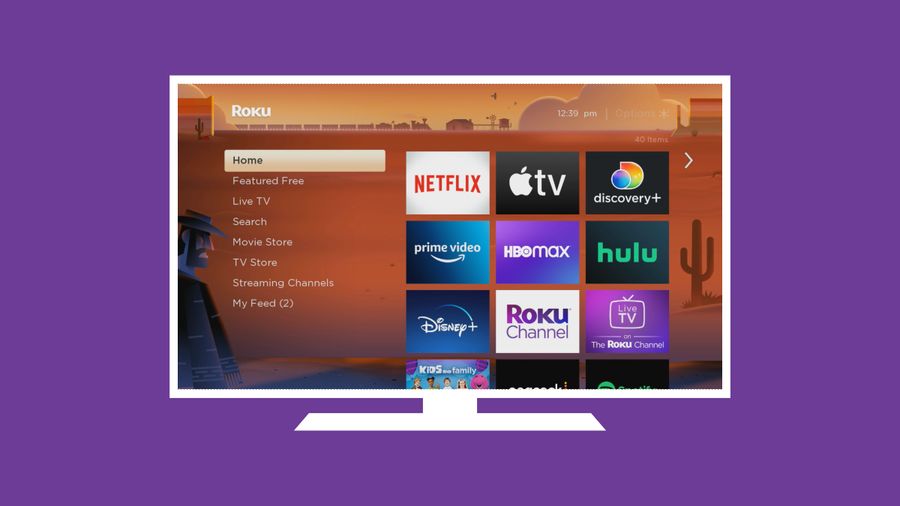
Roku home screen: a simple menu list on the left and rows of app tiles
Found on: Roku TVs, TCL, Hisense, Sharp

Roku

The simplest menu of the five. A plain list down the left side, your apps as big tiles. The usual pick for a first smart TV.

StrengthsSimplest to learn. The plainest menus here. The Roku Channel brings 500+ free channels — movies, news, and sports with no subscription.
Watch-outsBigger ads now. The 2026 update added a large permanent ad on the home screen — it is there from the moment the TV turns on.
RemoteSimple few-button remote with voice search. The 2026 remote can even help you find it when it slides into the couch.
Best forAnyone who wants the easiest menu and lots of free channels.
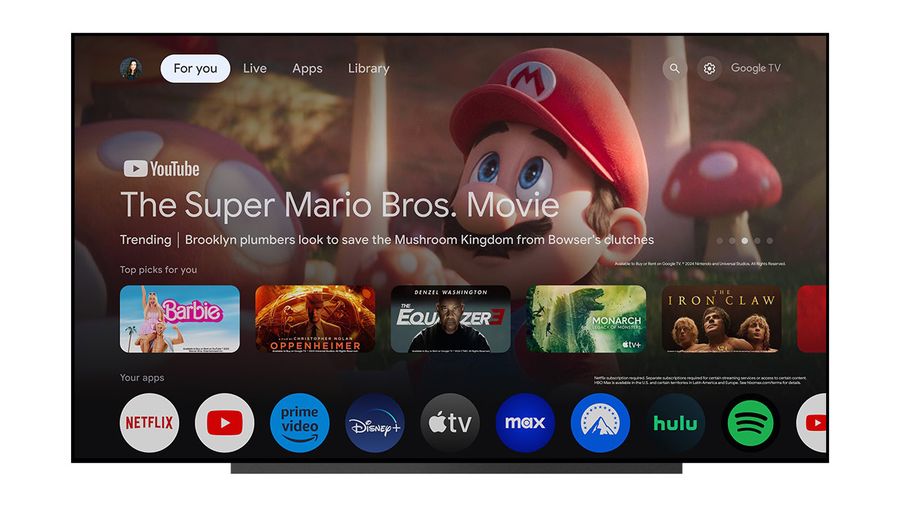
Google TV home screen: a featured show banner with rows of recommended apps below
Found on: Sony, TCL, Hisense

Google TV

The smartest helper. Talk to it like a person — it can even adjust the picture when dialogue is hard to hear. Enormous app library.

StrengthsBest voice control. Google Assistant built in, getting smarter in 2026. Over 10,000 free titles and 300+ free live channels included.
Watch-outsBusier screen. Rows of suggestions and sponsored picks can feel cluttered next to Roku’s plain list.
RemoteBrand remotes with a voice button — more buttons than Roku’s, but straightforward.
Best forGoogle and Android households, and people who like talking to the TV.
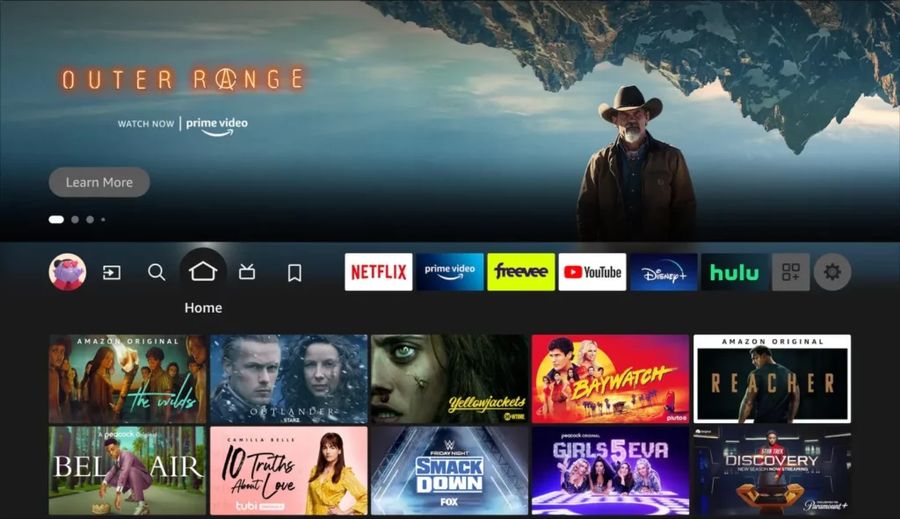
Fire TV home screen: navigation tabs across the top with app icons and show rows
Found on: Amazon TVs, Toshiba, Insignia

Fire TV

Alexa runs the show. “Alexa, play the news” — and your smart-home gadgets obey too.

StrengthsAlexa everywhere. Great if you already use Alexa. The fast 2026 redesign lets you pin 20 favorite apps up top. Amazon’s own TVs support both Dolby Vision and HDR10+.
Watch-outsMost ads. The heaviest advertising of any platform — a big ad banner sits on the home screen and can nearly fill it. The remote’s sponsored app buttons cannot be changed.
RemoteSimple Alexa voice remote, but it carries sponsored buttons for apps you may never open.
Best forAmazon Prime members and Alexa smart-home households who don’t mind ads for a lower price.
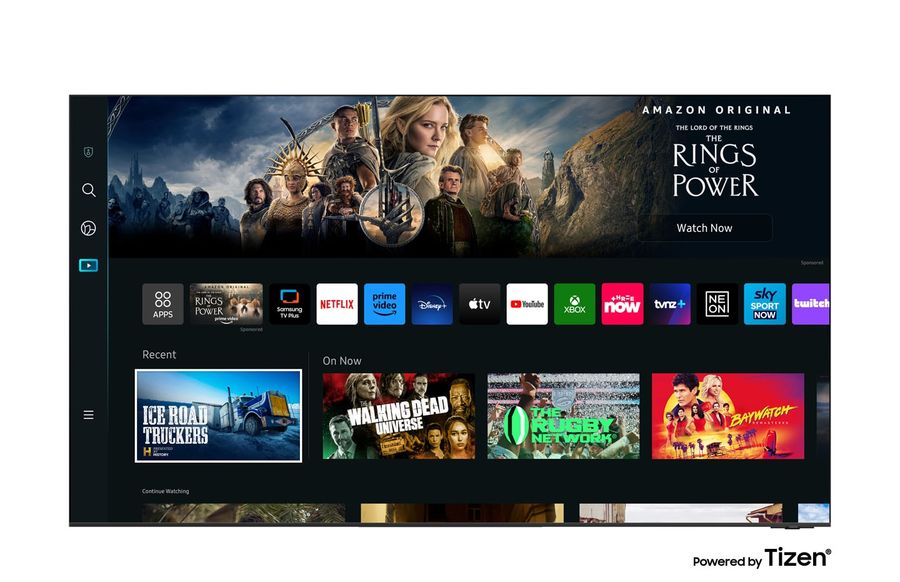
Samsung Smart Hub: a slim side menu with a featured banner and rows of apps
Found on: Samsung only

Samsung Tizen

Quick, tidy, and supported the longest — up to 7 years of updates. The little remote never needs batteries.

StrengthsLongest support. Up to 7 years of software updates — the best in the business. The SolarCell remote charges from room light, so no batteries, ever. Built-in smart-home hub.
Watch-outsNo Dolby Vision. No Samsung TV has ever supported it — Netflix and Disney+ movies play in plain HDR instead. Samsung uses its own HDR10+ format.
RemoteSmall and minimal with few buttons — one of the simplest remotes sold.
Best forSamsung phone owners and gamers — not the pick for Dolby Vision movie lovers.
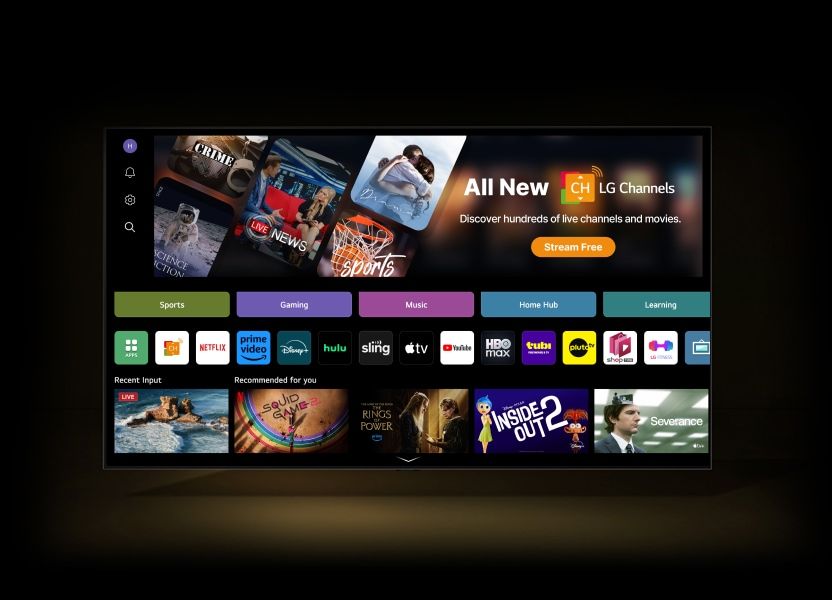
LG webOS home screen: category tabs with an app row and recommended shows
Found on: LG only

LG webOS

The movie lover’s menu — Dolby Vision plus LG’s famous OLED picture, in a fast, polished system.

StrengthsBest movie picture. Dolby Vision on 2026 models, paired with LG’s OLED screens — the richest picture you can buy. Fast, polished, and you can rearrange it your way.
Watch-outsPointer remote. The on-screen pointer is quick for some and fiddly for shaky hands. The home screen shows sponsored previews, though you can switch them off.
RemotePointer remote with a scroll wheel and voice — powerful, but busier than Roku’s or Samsung’s.
Best forMovie lovers who want the finest picture and don’t mind learning the pointer.
Don’t like the menu your TV came with?

You never have to live with it. A $30–$50 streaming stick — Roku Express or Fire TV Stick — plugs into any HDMI port and gives you a whole new menu. Many people never open their TV’s built-in menu again. One tip: on the cheapest Fire TV stick a few smaller apps are missing, so the $50 4K Plus is the safer pick.

When you shop: judge the TV by its picture first. The menu can always be changed later.

Shopping for a computer screen instead?

A monitor is just a screen for your computer — no channels, no apps, only what your computer shows it. For reading at a desk, a monitor is sharper than a TV: a 27-inch monitor at 1080p or 4K keeps text crisp, while the same words on a big TV look fuzzier because the picture is stretched much wider.

The short version: a 27-inch screen is the sweet spot for most desks, and 4K is worth it if you like your text large — big letters stay sharp instead of going fuzzy. Monitors use the same screen types as TVs — LED, QLED, Mini-LED, and OLED, compared above. Our Monitors guide has the full plain-English breakdown.

Want help choosing the right one?

Call Straight 2 Work Tech Solutions for patient help choosing, setting up, or mounting your new TV.

Prices are approximate and can change by the day. Amazon availability could not be checked live because Amazon blocks automated price checks. Use each button to see the current price before you buy.

Call Sean — (813) 770-6082