How to Enter BIOS/UEFI by Brand
The exact key to press at startup for Dell, HP, Lenovo, Acer, ASUS, and more.
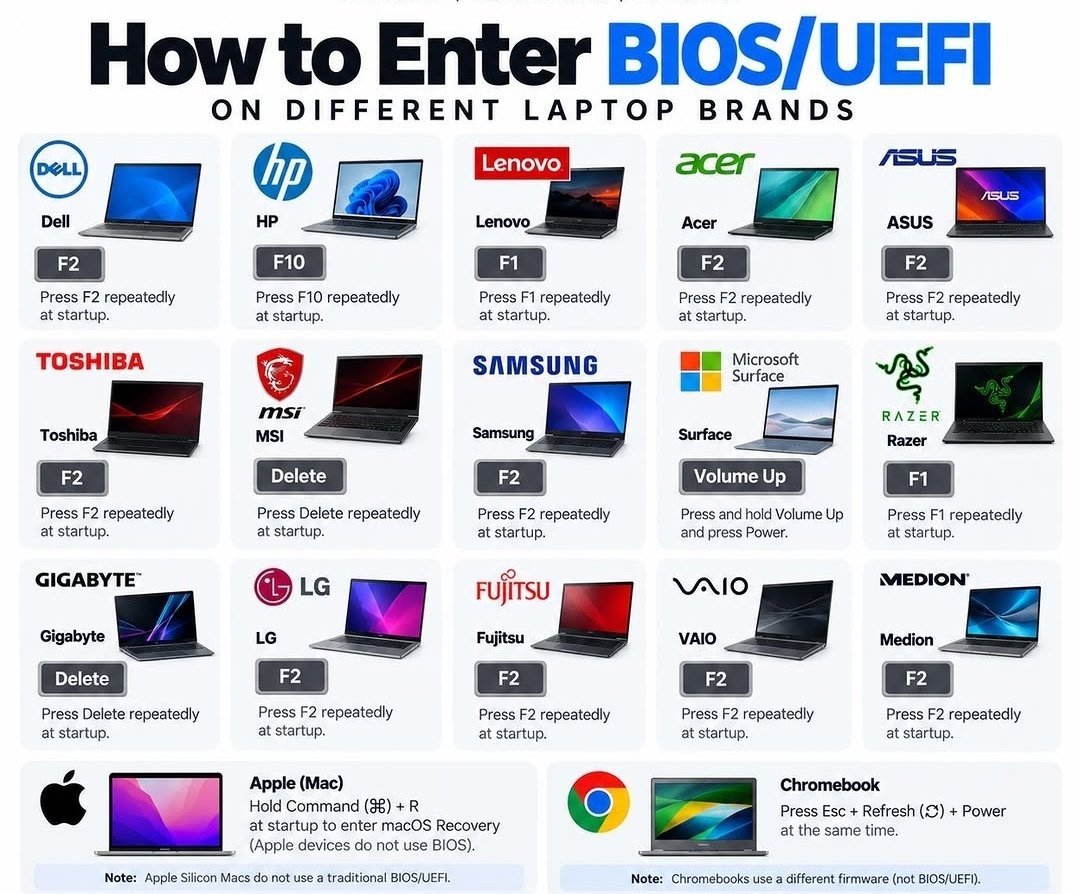
The easier door — and one correction to the chart
Try this first. On a modern Windows laptop you usually do not need a startup key at all. Open Settings → System → Recovery, and next to Advanced startup choose Restart now. When the blue menu appears, choose Troubleshoot → Advanced options → UEFI Firmware Settings and the computer restarts straight into the BIOS screens. No frantic key-tapping while the logo flashes by.
A correction about Lenovo: the chart lists Lenovo as F1. That is right for Lenovo’s ThinkPad business models. Most home Lenovos (the IdeaPad line) use F2, or the little recessed Novo button beside the power socket — press it with the computer off and a small menu appears. If F1 does nothing on your Lenovo, try F2.
Starting from a USB stick is a different door. That is the boot menu, not BIOS setup, and it has its own key: Dell F12, HP F9 (or tap Esc at startup, then F9), Lenovo F12. Tap it as the computer starts, then pick the USB stick from the list. Booting from a stick is the usual reason for a visit to this chart — and for that, the boot menu is the only stop you need.
Need a hand with this in person? Call (813) 770-6082 — Straight 2 Work Tech, LLC, Sun City Center, Florida.