USB Port Colors: Function & Speed Guide
The color inside a USB port is a hint about its speed — black usually means USB 2.0 (480 Mbps), blue usually USB 3.0 (5 Gbps), teal usually 10 Gbps. But colors are a habit of the makers, not a fixed standard, so treat them as a clue, not a promise. The short notes under the picture explain the exceptions that matter.
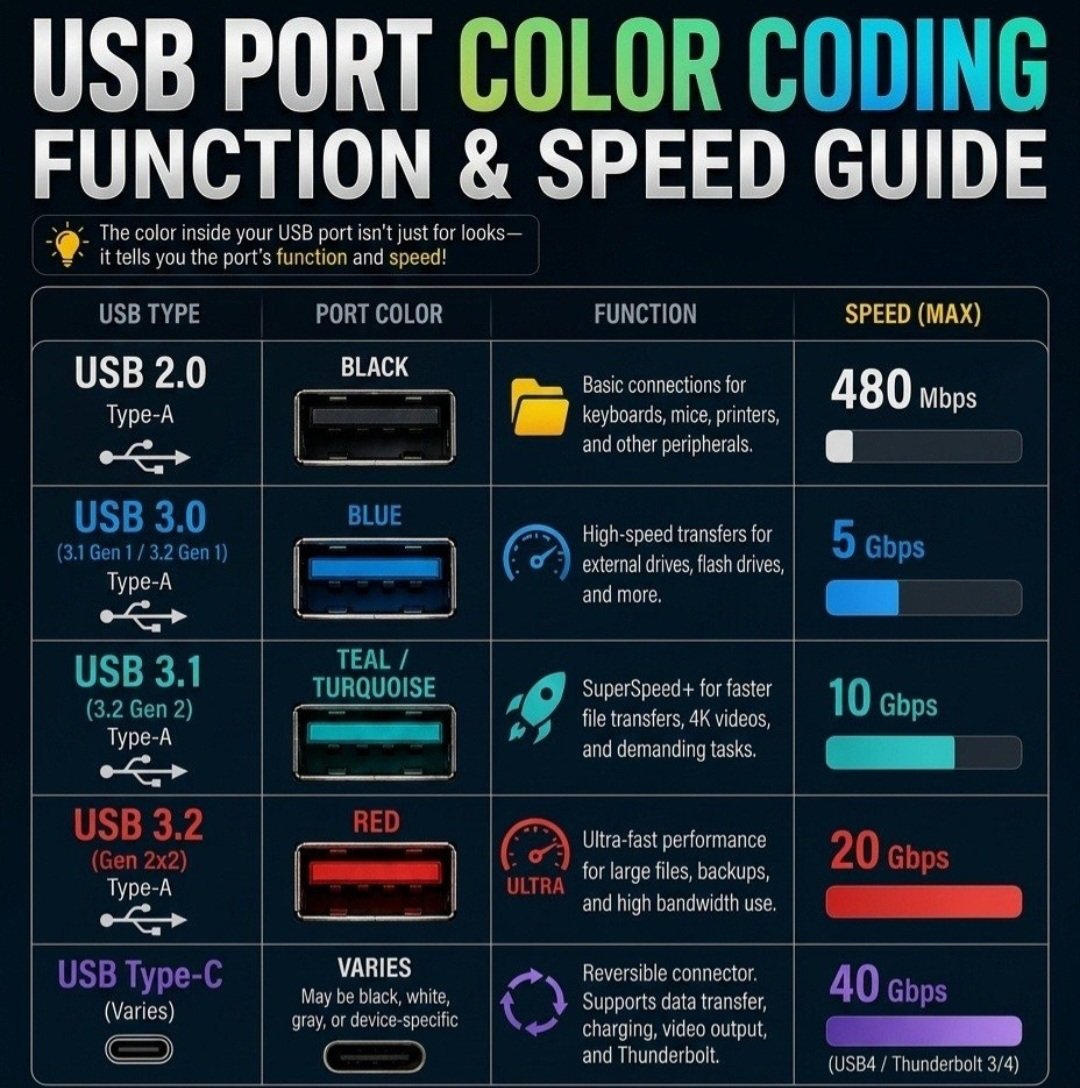
Read the colors as hints, not promises: port colors were never made an official standard, so each maker follows the habit loosely. A black, blue, or teal port usually means what the picture says — but it is not guaranteed.
Red and yellow often mean something else: on many laptops, a red or yellow port is an “always-on” charging port — it can charge a phone even while the computer is asleep or off. It is not automatically the fastest port in the row, whatever the picture suggests.
The USB-C shape promises nothing about speed: the small oval USB-C plug fits ports that range from slow USB 2.0 all the way to the fastest connections made. Two identical-looking USB-C ports on the same computer can have very different speeds.
What to trust instead: look for the small “SS” mark (SuperSpeed) stamped beside a port, or check the computer’s spec sheet. When it really matters — a big backup drive, say — the spec sheet is the only sure answer.
Need a hand with this in person? Call (813) 770-6082 — Straight 2 Work Tech, LLC, Sun City Center, Florida.