Armed When You Leave, Off When You're Home: Modes That Switch Themselves
Arming the cameras every time you leave, and disarming them when you get home, is a chore most people quietly stop doing. The apps know that, so each brand offers a way for the switching to happen on its own — by the clock, or by where your phone is. The three brands do it differently, and one of them does less than its name suggests. This lesson is the honest map. For cameras at a second house, this shelf's lesson Two Homes, One App: Cameras at Your Other Place sets up the houses themselves; modes apply inside each one.
First, what a mode is
A mode is a saved answer to one question: right now, should the cameras watch and alert, or rest? Ring names its three modes Disarmed, Home, and Away — and lets you choose, for each mode, which cameras record and which stay quiet. Blink keeps it simpler: a system is Armed or Disarmed, all its cameras together. Arlo uses Arm Away, Arm Home, and Standby. Switching modes by hand works fine. The rest of this lesson is about not having to.
Blink: the clock does it — this one is real
Blink has the plainest automatic switching of the three, and it truly switches. It is called Scheduled Arming, and it lives per system:
- Open the Blink app and tap Settings, then Device and System Settings.
- Pick the system you want on a schedule. Check its time zone is right while you are here — a wrong time zone is the one way this goes wrong.
- Tap Scheduling, then the + to add an arm time — say, 9 in the morning on weekdays, when the house empties.
- Add the matching disarm time the same way — 5 in the afternoon, when you are home again. You can add more pairs, including an overnight arm.
From then on the system arms and disarms itself. Going on vacation and want it armed around the clock? The Scheduling screen has a switch to pause the schedule without deleting it. One honest note: a scheduled change wins over a tap — if the schedule arms the system at 9 and you disarm by hand at noon, it stays disarmed until the schedule's next word on the subject.
Arlo: your phone's location does it
Arlo's version follows you, not the clock. In the Arlo app, under Routines (older app: Modes), you set two automations: when everyone leaves, switch to Arm Away; when anyone arrives, switch back to Arm Home or Standby. The app draws an invisible circle around your home — a geofence — and crossing it is the trigger. It works on a fair rule Arlo calls first in, last out: the house counts as empty only when the last family phone has left, and occupied again the moment the first phone returns.
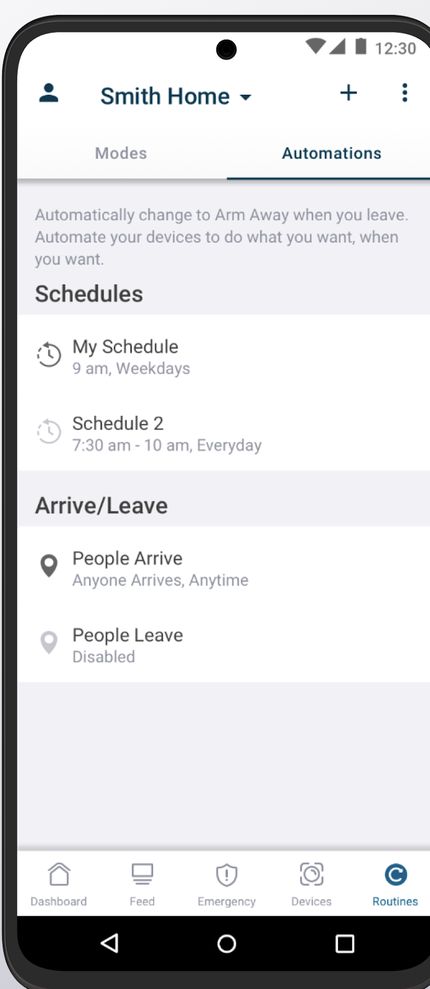
The catches are honest ones. Every phone that should count must be added, signed in, and carrying the app — a phone left on the counter tells the house you are home. The app needs your location permission set to Always, not just 'while using the app.' And a phone that is off or out of battery cannot report in, so the house may decide you have left when you have only gone silent.
Ring: a reminder, not a switch — know the difference
Ring's feature is called Geofence, and the name promises more than it does. Ring's own help page is plain about it: when you cross your home boundary, Geofence sends you a reminder to set Away mode, and another to set Home when you return. It does not change the mode for you — you still tap. What it can do on its own is Auto-Snooze: pause motion alerts for a while when you arrive home, so your own doorbell does not announce you to yourself. (Alert manners in general live in this shelf's lesson Tame the Alerts: Motion Zones and Sensitivity.)
Two more Ring facts worth knowing: Geofence needs a compatible Ring subscription and your phone's location permission set to Always. And if you own a Ring Alarm system, it adds Mode Schedules — the clock-based automatic switching, like Blink's — which camera-only homes do not get.
Which route fits your house?
- Your days run on a routine? The clock wins. Schedules never forget, never run out of battery, and work even if you leave your phone at home.
- Your days are irregular, and your phone is always with you? Arlo's location route follows the life you actually live.
- Ring cameras? Turn on Geofence for the reminders and the arrival snooze — and know that the tap is still yours, unless a Ring Alarm is in the house to run Mode Schedules.
The safety line, once: automatic switching is a convenience, not a promise. Once in a while, glance at the app and confirm the mode matches where you are — especially the first week, while the house and the phones are still learning each other.
Words in this lesson
- Mode: a saved setting that says whether the cameras are watching and alerting (Away / Armed) or resting (Home, Disarmed, Standby).
- Geofence: an invisible circle drawn around your home on the map. Your phone crossing its edge is the trigger.
- Arm / Disarm: to switch a camera system to watching, or to resting.
Straight 2 Work Tech, LLC — patient, plain-words tech help.
(813) 770-6082