Captioned Telephones: The Phone That Writes Down the Call
A captioned telephone looks like an ordinary phone with a reading screen. You speak and listen exactly as always — and the other person's words also appear on the screen in writing, as they say them. Miss a word with your ears, and you catch it with your eyes. For people whose hearing loss makes phone calls hard, a federal program provides the captioning at no cost, and often the phone itself as well. This lesson covers how it works, the names you will meet, who qualifies, and the form you sign.
Words to know first
- Captions: the words of a conversation, written out as they are spoken — the same idea as the captions on a television program.
- Captioning assistant: a trained person at the captioning service who listens to your caller and repeats their words clearly into a computer, which turns them into the text on your screen. Some services use speech-recognition software alone; both kinds are described below.
- IP CTS: the program's official name — Internet Protocol Captioned Telephone Service. It is the internet-based form of captioned telephone service, overseen by the FCC. You will see this name on the paperwork.
- Certification: the signed statement, required by the program, that your hearing loss makes captions necessary for you to use the phone. Signing up cannot happen without it.
How a captioned call works
- You dial and talk exactly as you do now. Nothing about the conversation changes for you or for the person calling you — they dial your number the ordinary way and hear an ordinary call.
- Behind the scenes, your call also connects to a captioning service. As the Federal Communications Commission (the FCC — the government agency that oversees phone service) describes it: a captioning assistant re-voices what the other person says into speech-recognition software, and the words travel back to your phone's screen, a second or two behind the voice. Newer services can caption with the software alone, with no person listening.
- You listen and read together. Most people with some hearing left find the combination far easier than either alone — the voice carries the feeling, the screen carries the facts: names, numbers, addresses, appointment times.
- The captions are confidential. Federal rules require it: the service may not keep or share what is said on your calls. The words cross the screen and are gone.
The names you will meet
- CapTel — the longest-running name in captioned phones. Its phones have large, clear screens; some models have touchscreens and adjustable text size. If a hearing office shows you one captioned phone, it is often this one.
- CaptionCall — a phone with a big screen and large buttons, delivered with setup help to get it running in your home.
- ClearCaptions — known for sending a specialist to your home to install the phone and teach you to use it, at the kitchen table, before they leave.
- All three are the same service underneath — the same federal program, the same captioning idea. The honest differences are the screen, the buttons, and how much setup help comes to your house. Any of them is a reasonable choice; the one your audiologist works with is a sensible place to start.
- Captions on the smartphone you already own: apps such as InnoCaption put the same program's captions on your cell phone — calls you make and take on the mobile get captions on its screen. And both iPhone and Android have built-in switches that caption ordinary calls with the phone's own computer — our lesson Captions on Video Calls shows those, and our chart Captions On lines the switches up. The built-in switches are a fine first try; the services in this lesson are the regulated kind, built for people who truly need the words right.
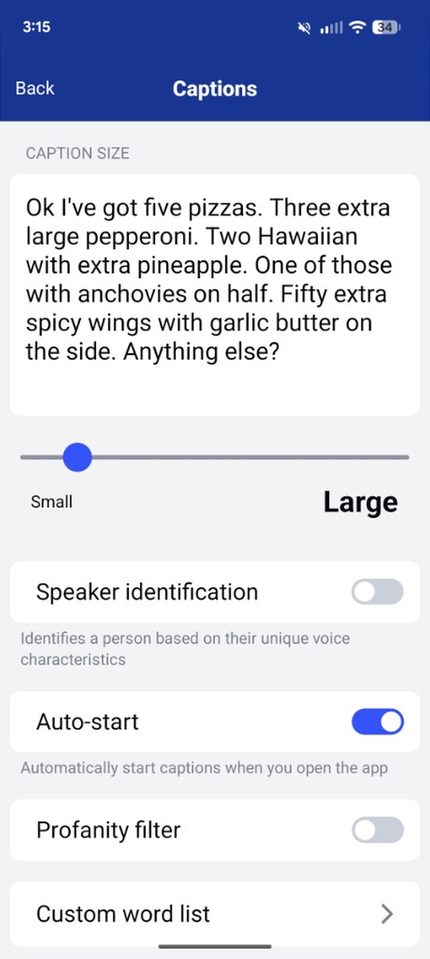
InnoCaption's Captions screen: the caller's words written out in the white box, and the slider that makes the writing smaller or larger.
The federal program that pays for it
- Captioned telephone service is part of a federal program overseen by the FCC. A federal fund — paid into by the phone companies, as the law requires — pays the captioning companies for each captioned call.
- That is why the captioning costs a qualified user nothing, and why the providers commonly supply the phone itself at no cost too. It is not a sales trick and it is not too good to be true; it is how the program was built, so that a person who needs captions to use the phone can use the phone like everyone else.
- Your regular phone service still applies — the captioned phone works with your home phone line or internet connection as the provider sets it up. The free part is the captioning, and usually the special phone.
Who qualifies — and the form you sign
- The test is necessity, not enjoyment. The program is for people whose hearing loss means they need captions to use the telephone effectively. If you hear calls well enough without help, this program is not for you — it is a disability service, and it is protected like one.
- Signing up includes a certification. You sign a form stating that your hearing loss necessitates captioned telephone service, and that you understand the captions are paid for by a federal program. The provider collects it when you register; nobody gets captions without it.
- When the phone itself is provided at no cost, a hearing professional — a doctor or an audiologist — may also need to sign a form confirming your hearing loss. The provider will tell you exactly which forms your case needs.
- One registration per person, and the captions are for the person who registered. A spouse with good hearing uses the phone as an ordinary phone, with the captions off — the phone works fine that way.
- If hearing aids are part of your life, our lesson Hearing Aids You Can Buy Yourself covers the over-the-counter kind. Captioned phones and hearing aids solve different halves of the same problem, and many people use both.
Getting set up, step by step
- Choose a provider. Ask your audiologist who they work with, or contact one of the names above by phone or on its website.
- Register and sign the certification. You will give your name, address, and phone number, and sign the form described above. If a professional's signature is needed, the provider tells you how it is collected.
- The phone arrives, or an installer brings it. It connects to power and to your home internet (some models also use a regular phone line — the provider will tell you what yours needs). Installation help is normal in this field; ask for it rather than struggling.
- Make a practice call to a family member. Adjust the volume, the size of the text, and how the screen behaves. Say numbers and names on purpose, and watch them arrive in writing.
- Tell your regular callers nothing changes. They dial your number as they always have. The only difference is on your end of the line.
Honest limits
- Captions trail the voice by a second or two. Very fast talkers outrun them. It is normal to let the other person finish, then glance at the screen before answering.
- Mistakes happen — background noise, a strong accent, or three people talking at once can put a wrong word on the screen. Treat captions as a very good listener, not a perfect one: for a medication name or a money figure, ask the caller to repeat it, and read it back.
- The service captions the other person, not you. Your own words do not appear — you know what you said.
- In an emergency, the phone dials 911 like any phone. Say your address out loud first, before anything else — captions may lag, and your voice does not.
The whole everyday set is lined up side by side in Everyday Life Apps at a Glance.
Words in this lesson
- FCC: the Federal Communications Commission — the federal agency that oversees telephone service in the United States, including this program.
- Audiologist: a hearing specialist — the professional who tests hearing, fits hearing aids, and can confirm the hearing loss this program asks about.
- Re-voicing: the captioning assistant's technique — repeating the caller's words clearly into software that turns speech into text accurately.
Straight 2 Work Tech, LLC — patient, plain-words tech help.
(813) 770-6082