Connect a Bluetooth Speaker
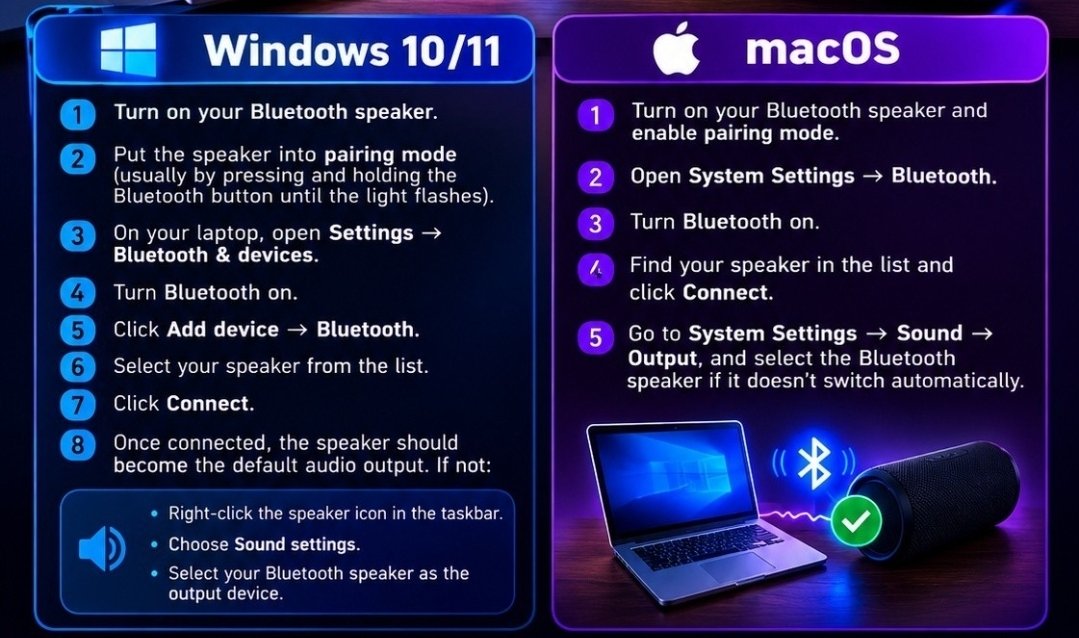
Step-by-step pairing for Windows 10/11 and Mac: put the speaker in pairing mode, turn Bluetooth on, add the device, connect, and check the sound output.
Playing through the speaker from a phone or tablet
The chart covers computers. The pairing most people actually want is from a phone or tablet — and it is the same idea with a shorter trip:
iPhone or iPad: turn the speaker on and put it in pairing mode (its light usually blinks), then Settings → Bluetooth and tap the speaker’s name under Other Devices. Samsung phone or tablet: Settings → Connections → Bluetooth. Pixel and other Android: Settings → Connected devices → Pair new device. Fire tablet: Settings → Connected Devices → Bluetooth. Once it is paired, music and calls play through the speaker on their own.
If the speaker will not pair, it is usually already spoken for. A speaker can play for only one device at a time, and it often reconnects to the last one automatically — your phone may be silent because the speaker is busy playing for the tablet in the other room. Turn Bluetooth off on that other device (or have it "forget" the speaker), then pair again. That fixes the great majority of "it won’t connect" calls.
Need a hand with this in person? Call (813) 770-6082 — Straight 2 Work Tech, LLC, Sun City Center, Florida.