Change Your Desktop Background
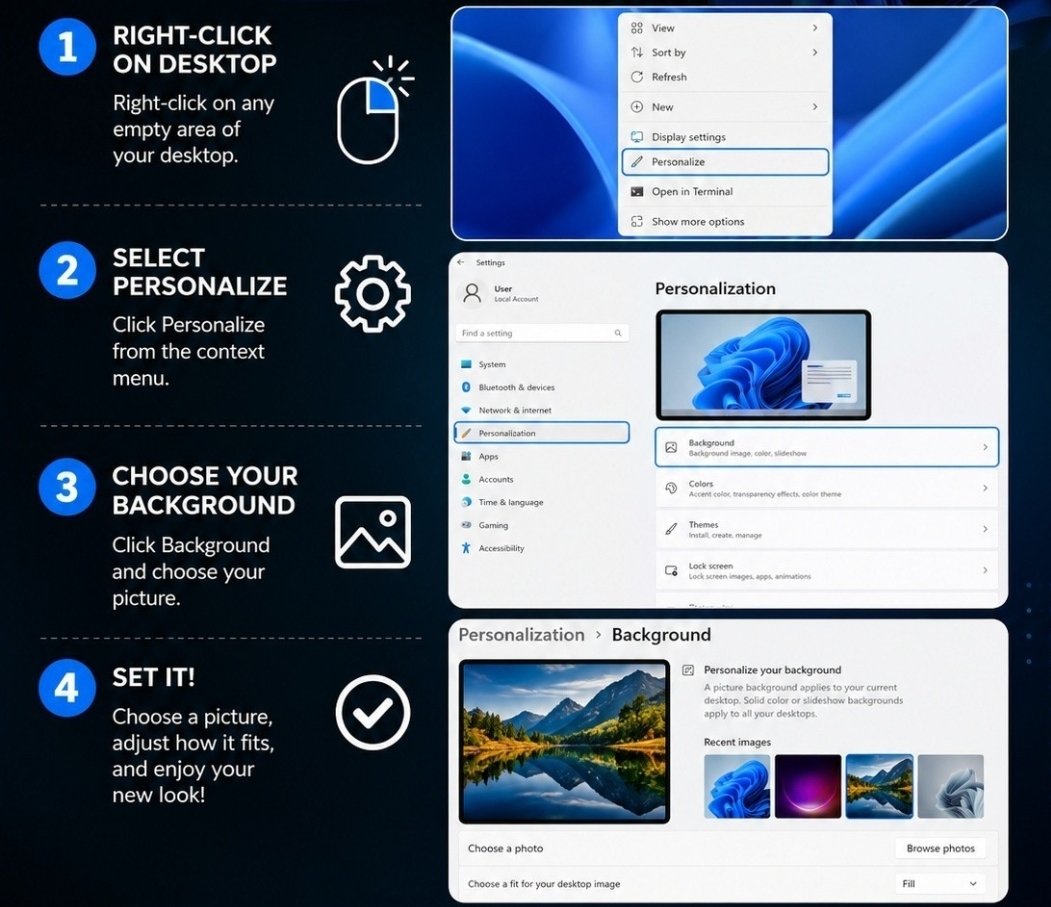
Right-click an empty spot on the desktop, choose Personalize, then Background, and pick your picture. Four steps with the actual Windows screens shown.
On a Mac, it works like this
The steps in the chart are for Windows. A Mac changes its background picture in its own settings: click the Apple menu (the apple at the top left of the screen), choose System Settings, then Wallpaper in the list on the left.
From there you can pick one of Apple’s ready-made pictures, or use one of your own photos — your Photos library is right there in the same screen on most Macs. On an older Mac the same door is called System Preferences → Desktop & Screen Saver. Pick the picture and close the window; there is nothing to save.
Need a hand with this in person? Call (813) 770-6082 — Straight 2 Work Tech, LLC, Sun City Center, Florida.